

I created a few #WWDC23 desktop images / wallpaper designs! Right click to download.


I created a few #WWDC23 desktop images / wallpaper designs! Right click to download.

This article will be continually updated as new information comes in.
The next day (March 28th) Apple released macOS Ventura 13.4 Beta 1 (22F5027f)
macOS 💻 ✅
iOS📱✅
Click “Continue Reading” for the rest of the article.
Continue reading “macOS Ventura 13.3 Update (22E252)! What’s New?”
This article will be continually updated as new information comes in.
The Ventura 13.2.1 is a security fix release and does not include any new features. The most import one is the Webkit CVE-2023-23529 vulnerability. NOTE: Apple is aware of a report that this issue may have been actively exploited.
Apple did not release a security update for Monterey or Big Sur. They did release Safari 16.3.1 for macOS Monterey and Big Sur as a separate software update download.
The numbers below are from the Ventura Patch Notes.
macOS 💻 ✅
iOS📱✅
Click “Continue Reading” for the rest of the article.
Continue reading “macOS Ventura 13.2.1 Update (22D68)! What’s New?”
This article will be continually updated as new information comes in.
In macOS Ventura 13.2, Apple added a mechanism for shipping security fixes to users more frequently. These responses are included in any ensuing minor update (not upgrade) and, on a Mac, updated content appears on the Preboot volume (through symbolic links in /System/Cryptexes/).
This update introduces Security Keys for Apple ID, and includes other enhancements and bug fixes for your Mac. Security Keys for Apple ID allow users to strengthen the security of their account by requiring a physical security key to sign in.
If you were getting this Apple ID error, it is fixed in 13.2
Enter your password to set up iCloud.
Enter the password for the Apple ID “(null)”.

The numbers below are from the Ventura Patch Notes.
macOS 💻 ✅
iOS📱✅
Click “Continue Reading” for the rest of the article.
Continue reading “macOS Ventura 13.2 Update (22D49)! What’s New?”
UPDATE 1/6/26: The RSR update system is now deprecated. Apple has replaced RSR updates with the new “Background Security Improvements” Update system. More info –> https://support.apple.com/guide/deployment/background-security-improvements-dep93ff7ea78/web
Starting with macOS Ventura, Apple has added a new feature called “Rapid Security Response”. This new update system was designed so that Apple can quickly deploy a small targeted security update. Users no longer have to wait for a large OS updates to be fully protected.
This database will contain both the OS and Safari version number changes when a RSR update is made available.
NOTE: I’ve included an direct Apple download link for each RSR. The update can not be installed manually, but you can inspect it.
| Ventura RSR Build Version | Version | platform | Date |
| Ventura 13.4.1 (c) 22F770820d | 13.4.1 (c) | M1/M2 | 7/12/23 |
| Ventura 13.4.1 (c) 22F770820d | 13.4.1 (c) | Intel | 7/12/23 |
| NOTE: Apple pulled the macOS Ventura 13.4.1 (a) RSR Update. | |||
| Ventura 13.4.1 (a) 22F770820b | 13.4.1 (a) | M1/M2 | 7/10/23 |
| Ventura 13.4.1 (a) 22F770820b | 13.4.1 (a) | Intel | 7/10/23 |
| Ventura 13.3.1 (a) (22E772610a) | 13.3.1 (a) | M1/M2 | 5/01/23 |
| Ventura 13.3.1 (a) (22E772610a) | 13.3.1 (a) | Intel | 5/01/23 |
| Ventura 13.2 (22D7750270e) (b) | 13.2 (b) | Beta | 1/09/23 |
| Ventura 13.2 (22D7750270d) (a) | 13.2 (a) | Beta | 12/15/22 |
| Ventura 13.2 Beta 1 | No RSR | ||
| Ventura 13.1 | No RSR |
| Ventura RSR Version | Safari Version | Date |
| Ventura 13.3.1 (a) | Safari 16.4 (18615.1.26.110.1) | 5/1/23 |
| Ventura 13.2 (b) Beta | Safari 16.2 (18614.4.1) | 1/09/23 |
| Ventura 13.2 (a) Beta | Safari 16.2 (18614.4.1.500.1) | 12/15/22 |
| Ventura 13.2 Beta 1 | Safari 16.2 (18614.4.1) | No RSR |
| Ventura 13.1 | Safari 16.2 (18614.3.7.1.5) | No RSR |
NOTE: RSR and macOS Updates are cumulative.
Example: Ventura 13.2 (a) <– Ventura 13.2 (b) <– Ventura 13.3
Each new version of macOS includes the previous fixes.

This article will be continually updated as new information comes in.
The numbers below are from the Ventura Patch Notes.
macOS 💻 ✅
iOS📱✅
Click “Continue Reading” for the rest of the article.
Continue reading “macOS Ventura 13.1 (22C65) Update! What’s New?”
UPDATED: 12/14/22
Today Apple released the 12.6.2 update, it is the 11th overall for macOS Monterey. The previous update 12.6.1, was released a month and a half ago. Let’s jump in and find out what’s new in this update.
Enterprise & Education macOS Ventura Upgrade Note:
The 12.6.1 Update is required if you need to block macOS Ventura via Major MDM (1-90) Day deferral. Now that Ventura 13.1 is out, the upgrade will start showing up as a delta upgrade for 12.3-12.6 users. The only way to block the delta upgrade it is to update to 12.6.1. After doing so, you can block the delta upgrade via Major Deferral. If you have some Macs still on 12.3-12.6 you can still block the delta upgrade via Minor MDM deferral. Keep in mind you will be in a catch 22 if you do this, as users will not be able to download the 12.6.2 update. BUT they will be able to install the 12.6.1 update still if you have the deferral date set to under 50 days.
WiFi connectivity issue in crowded area bug fixed in 13.1! https://systemstatus.ucla.edu/status?id=status_record&service=a8226ec01b1651509ca4a602b24bcb20
Apple’s description of the 12.6.2 update:
“This update is recommended for all users and improves the security of macOS.“
That means that this update is focused around security and not bug fixes or new features.
Quick Summary

macOS 💻 ✅
iOS📱✅

Apple just released macOS Big Sur 11.7.2, let’s jump in and find out what’s new!
Big Sur is now in Security Update mode. Apple still fixes previous update bugs & major issues in Big Sur and Catalina updates, but usually only address security issues.
macOS 💻 ✅
iOS📱✅
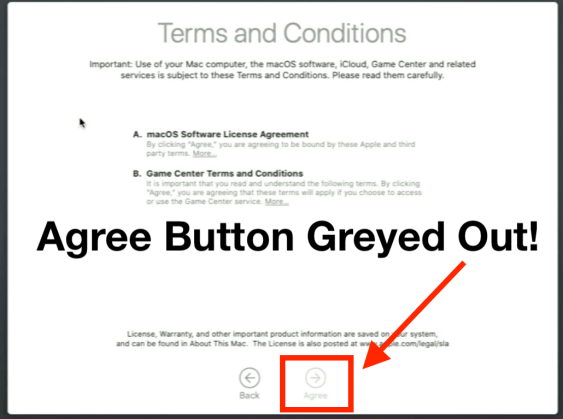
UPDATED 1/10/23
A quick summary of the issue.
The issue is triggered after attempting to sign into iCloud at the setup assistant window after installing macOS with the following OS listed below. You will be unable to continue past the screen, because the Agree button is greyed out.
The issue affects the following macOS versions 👇
The issue can be reproduced every time by attempting to sign into iCloud in the setup assistant window.
The fix is very simple, all you need to do is click the back button. Then click “Set Up Later” at the top of the Sign In with Your Apple ID window.

Walk though the rest of the macOS setup assistant until you get to the desktop.
The good news is that you can sign into iCloud in system preferences after the setup assistant.
Unknown at this time. Could it be a server side issue? I will update if I find any further info.

This article will be continually updated as new information comes in.
The Ventura 13.0.1 patch notes state:
This update includes bug fixes and security updates and is recommended for all users.
We know the update fixes security vulnerabilities but how many and what kind of bugs are fixed?
UPDATE: @0xmachos – Nov 10 Appears that macOS Ventura 13.0.1 has fixed the Endpoint Security Framework (ESF) Full Disk Access (FDA) permission bug https://github.com/objective-see/BlockBlock/issues/54#issuecomment-1310082160
The numbers below are from the Ventura Patch Notes.
macOS 💻 ✅
iOS📱✅
Click “Continue Reading” for the rest of the article.
Continue reading “macOS Ventura 13.0.1 (22A400) Update is Live! What’s New?”